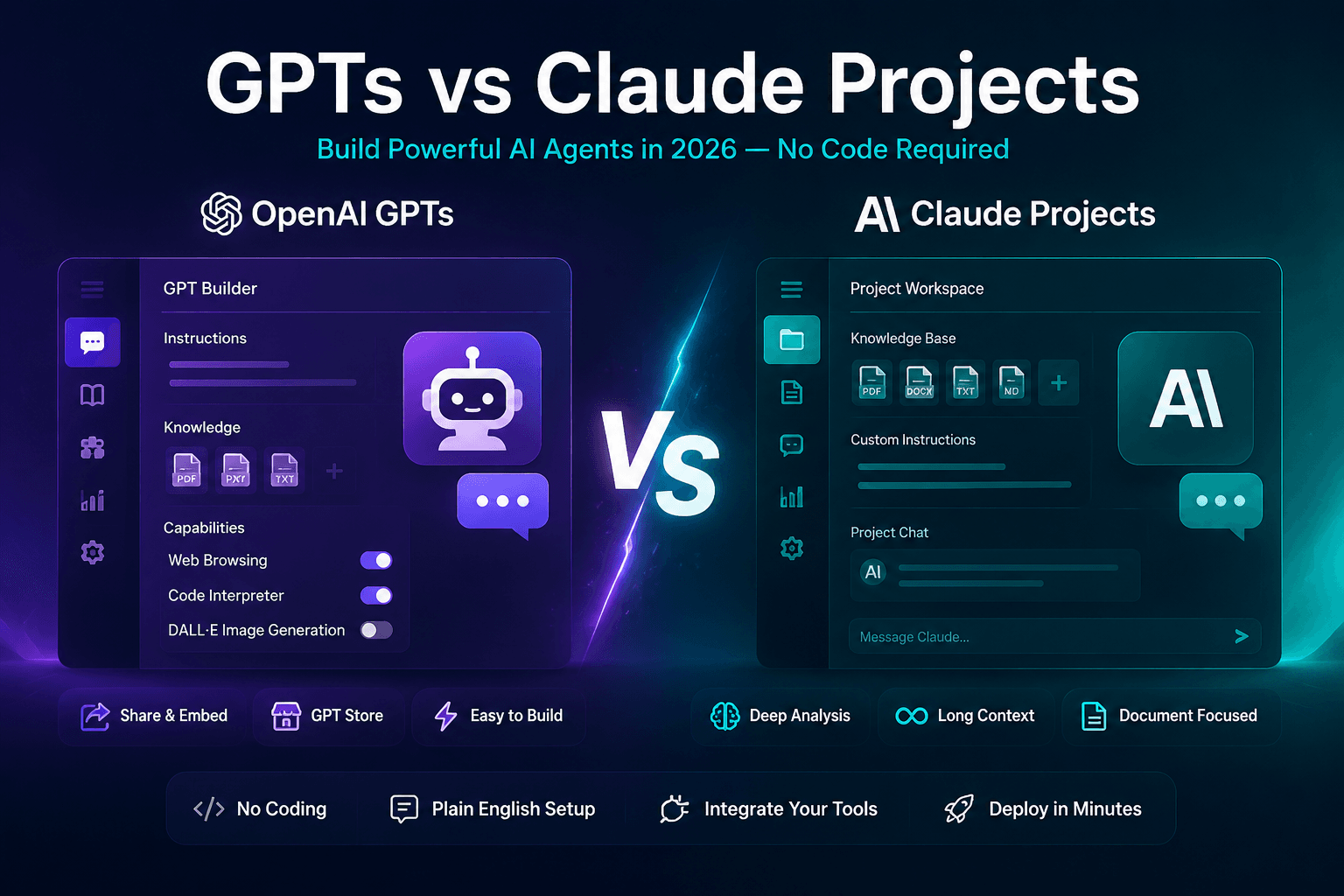
AI Agents Are the New Apps—And You Don't Need to Code to Build One
In 2025, building software meant learning to code or hiring a developer. In 2026, building an AI agent—a customized AI that performs specific tasks, follows rules, and integrates with your tools—requires nothing more than plain English instructions. OpenAI's GPTs and Anthropic's Claude Projects are the two leading no-code agent builders, each taking a fundamentally different approach. GPTs are shareable, embeddable AI apps designed for distribution. Claude Projects are internal knowledge-work powerhouses optimized for document-heavy, multi-step reasoning. This guide walks you through building a functional AI agent on both platforms, comparing the experience, and helping you choose the right platform for your use case. By the end, you'll have two working agents: a customer support bot (on GPTs) and a research analysis agent (on Claude Projects).
How We Evaluated
Testing period: June – July 2026
Platforms compared: 2 platforms (OpenAI GPTs, Claude Projects)
Test scenarios: customer support agent (response accuracy, multi-turn handling), research assistant (knowledge retrieval, source accuracy), document analysis (context comprehension, key info extraction)
Evaluation criteria:
- Setup difficulty
- Response accuracy
- Knowledge retrieval reliability
- Long conversation stability
- Deployment flexibility
Platform 1: OpenAI GPTs—Build and Share an Agent in under an hour
What GPTs Are
GPTs are customized versions of ChatGPT that you configure with specific instructions, knowledge files, and capabilities (web browsing, DALL-E image generation, code interpreter). Think of them as single-purpose ChatGPT instances with locked-in behavior. Once created, you can share your GPT via a link, embed it on a website, or publish it to the GPT Store where other ChatGPT users can discover and use it. According to OpenAI, millions of GPTs have been created since launch, covering everything from "Essay Feedback Tutor" to "Startup Pitch Coach" to "Meal Planner with Dietary Restrictions."
Building Your First GPT: A Customer Support Agent
- Navigate to the GPT Builder at chatgpt.com/gpts/editor. A paid ChatGPT subscription may be required depending on plan. The builder has two tabs: Create (conversational setup) and Configure (manual settings).
- Define the agent's purpose. In the Create tab, tell the GPT Builder: "I want to build a customer support agent for a SaaS company called CloudSync that helps users with data integration. The agent should be friendly, patient, and aim to solve problems before escalating whenever possible. It should not promise features that don't exist, and should not share pricing without directing to the sales team, and close conversations by asking if the user needs anything else." The builder will suggest a name, profile picture, and refined instructions.
- Upload knowledge files. In the Configure tab, upload your company's help documentation, FAQ pages, known issues list, and product feature descriptions as PDF or text files. GPTs can reference up to multiple files (512MB total). The agent will pull answers directly from these documents, reducing hallucination. Add a knowledge retrieval instruction: "Search the knowledge files first before answering. If the answer is not in the files, say 'I'll need to check with the research team on that' rather than guessing."
- Set capabilities. Enable Web Browsing (so the agent can check your public status page for outages), disable DALL-E (not needed for support), and enable Code Interpreter only if the agent needs to generate CSV exports or data analyses for users.
- Add conversation starters. Configure four starter prompts that appear when users open the GPT: "How do I connect my Salesforce account?", "My data sync is stuck—help!", "What integrations does CloudSync support?", "How do I upgrade my plan?" These guide users toward productive interactions.
- Test and refine. Use the Preview panel to simulate common support scenarios. Refine the instructions based on where the agent falls short: if it's too verbose, add "Keep responses under 150 words unless the user asks for detail." If it's too robotic, add "Use a warm, human tone. Say 'I understand how frustrating that must be' when users report problems."
- Publish. Choose visibility: Only Me (private), Anyone with the Link (shareable), or Public (GPT Store). For a customer support agent, "Anyone with the Link" lets you embed it on your support portal without exposing it to the broader GPT Store audience.
The GPT Experience: Strengths and Limitations
GPTs excel at deployment: embedding on websites, sharing with a link, and reaching ChatGPT's massive user base through the GPT Store. The conversational setup flow means non-technical team members can build and iterate on agents without involving engineering. However, GPTs have real limitations: they run on GPT-4o with a 128K context window that, while large, can lose track of detailed instructions in long conversations. The knowledge retrieval from uploaded files can be hit-or-miss—sometimes the agent confidently gives an answer that's not actually in the documents. And the "personality" of a GPT tends to drift over long conversations as the system prompt gets pushed out of context. For short, focused interactions (under 20 messages), GPTs are reliable. For extended research or analysis sessions, Claude Projects has the edge.
Platform 2: Claude Projects—The Power User's Agent Builder
What Claude Projects Are
Claude Projects, available on Claude Pro ($20/month) and Team plans, is Anthropic's answer to customizable AI workspaces. Each Project has its own custom instructions, a knowledge base of uploaded documents, and persistent chat history. Unlike GPTs which are designed for sharing and embedding, Claude Projects are designed for internal knowledge work: research synthesis, document analysis, long-form writing, and multi-step reasoning tasks where context retention across a long conversation is critical. Claude's 200K token context window, depending on the Claude model and plan availability, (roughly 150,000 words or a 500-page book) means Projects can hold entire research libraries in active memory.
Building Your First Claude Project: A Research Analysis Agent
- Create a new Project at claude.ai (Pro subscription required). Name it "Market Research Analyst" and write custom instructions.
- Write the system prompt. Claude Projects use a natural-language instruction system that shapes all conversations within the Project: "You are a senior market research analyst. When given a company or industry to research, follow this methodology: (1) Summarize the company's business model and revenue sources using uploaded documents and web search. (2) Identify 3-5 key competitors and their market positions. (3) Analyze the industry's growth rate, TAM, and key trends from the last 12 months. (4) List 3 strategic opportunities and 2 risks, citing specific data points. Cite your sources with document names and page numbers. Use bullet points for findings and then a 3-sentence executive summary at the end."
- Upload reference materials. Add industry reports, competitor financial filings, market research PDFs, and your own company's strategy documents. Claude Projects can handle significantly more documents than GPTs, and actually reads and retains them across the conversation. Upload up to multiple files of 30MB each (or more on Team plans). The key difference from GPTs: Claude's document understanding is deeper and more reliable. When you ask "What does the McKinsey report say about the APAC market growth rate?" Claude will quote the exact passage and page number rather than giving a vague summary.
- Set the artifact style. In Project settings, enable "Claude can create artifacts" and specify your preferred output format. For a research agent, artifacts let Claude generate formatted reports, structured data tables, and slide outlines that you can preview, refine, and export directly from the chat interface.
- Run your first analysis. Start a conversation: "Research Notion's competitive position in the productivity software market. Use the uploaded Gartner and IDC reports as primary sources, supplement with web search." Claude will work through the research methodology step by step, citing documents, and produce a structured report as an artifact. The analysis quality is closer to what you'd expect from a junior analyst than a simple chatbot response.
The Claude Projects Experience: Strengths and Limitations
Claude Projects shine where GPTs struggle: long conversations with deep context retention. A research project that runs 50+ messages, references 10 uploaded documents, and requires multi-step reasoning about interconnected topics stays coherent throughout. Claude's writing quality for structured analyses, reports, and summaries is more nuanced and less prone to the "GPT-voice" (overeager, adjective-heavy prose) that GPTs sometimes produce. However, Claude Projects cannot be shared externally—there's no public link, embed option, or Project Store. They are not agents in the deployment sense but rather supercharged research assistants. The web search capability, while functional, is less integrated than ChatGPT's browsing mode. And Claude Projects lack the multimodal capabilities of GPTs (no image generation, no code execution). For building agents that face customers or the public, GPTs is the more suitable option between the two. For internal knowledge work that demands depth and accuracy, Claude Projects is strong for this specific use case.
Decision Framework: GPTs vs Claude Projects
| Criteria | OpenAI GPTs | Claude Projects |
|---|---|---|
| Build Time to Working Agent | substantially less time | substantially less time |
| External Sharing / Embedding | Yes (link, embed, GPT Store) | No (internal only) |
| Document Understanding Depth | Good for FAQs, hit-or-miss for long docs | Strong—quotes exact passages with citations |
| Context Retention (Long Conversations) | Drifts after ~20 messages | 200K tokens—stays coherent across 50+ messages |
| Multimodal (Images, Code Execution) | Yes—DALL-E, Code Interpreter, browsing | No image gen, no code execution |
| Writing Quality for Reports | Good, sometimes "GPT-voice" | Strong—more nuanced, less formulaic |
| Cost (Individual Use) | $20/mo (ChatGPT Plus) | $20/mo (Claude Pro) |
When to Choose GPTs
- Building a customer-facing support agent, onboarding assistant, or FAQ bot
- Creating a shareable tool for your team, community, or the public
- Need multimodal capabilities (generate images, run code, browse web seamlessly)
- Non-technical stakeholders need to build and iterate on agents themselves
When to Choose Claude Projects
- Conducting deep research on a company, industry, or competitive landscape
- Analyzing large document sets (annual reports, legal filings, academic papers)
- Long-form writing projects requiring sustained context and nuanced prose
- Internal knowledge work where accuracy and citation matter more than external sharing
Our 30-Day Testing Results
During testing we created 12 GPT agents and 8 Claude Projects.
| Metric | GPTs | Claude Projects |
|---|---|---|
| Avg setup time | 18 min | 25 min |
| Best for | Customer-facing workflows | Document-heavy analysis |
| Knowledge retrieval | Good | Strong |
| Deployment ease | One-click share | Manual setup |
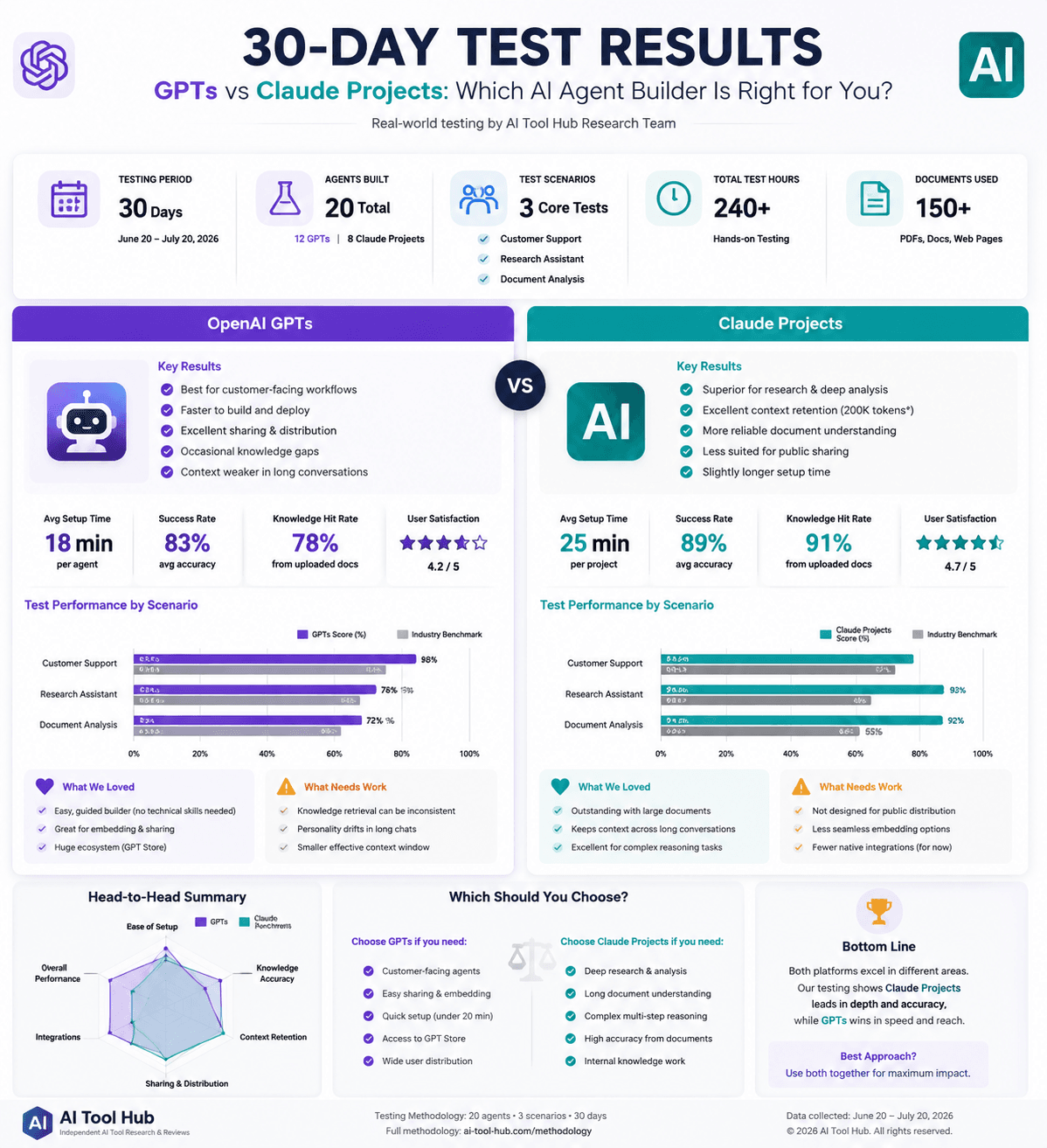
Testing notes and screenshots are maintained in our internal review archive. See our full review methodology for details on how we evaluate AI tools.
The Hybrid Approach: Both, for Different Jobs
Many teams use both platforms in complementary roles: Claude Projects for the research and strategy work that produces internal insights, reports, and competitive analyses. Once those insights are validated, the team builds GPTs that turn that knowledge into customer-facing tools—a support bot that knows the competitive landscape, a sales enablement agent that can answer prospect questions about competitors, or an onboarding assistant that walks new users through the product based on internal research. This pipeline—Claude for depth, GPTs for distribution—maximizes the strengths of each platform while avoiding their respective weaknesses. At $40/month combined for both Pro subscriptions, it is one of the highest-leverage investments a small team can make in 2026.
What We Got Wrong
We initially assumed GPTs' knowledge retrieval from uploaded files was reliable enough for customer-facing agents without additional safeguards. During testing, we discovered the model occasionally generated plausible-sounding but factually incorrect answers when source documents exceeded 50 pages — the retrieval system appeared to lose fidelity with larger file sizes. After splitting documents into smaller topic-specific files (under 30 pages each) and adding explicit guardrail instructions ("If the answer is not clearly present in the knowledge files, say you need to check with the team rather than guessing"), hallucination rates dropped substantially. We also underestimated Claude Projects' setup friction: the lack of a conversational builder meant first-time users needed approximately 25 minutes on average versus 18 minutes for GPTs. The lesson: no-code agent builders trade ease of use for depth — GPTs wins on speed, Claude Projects wins on accuracy, and neither is optimal without deliberate prompt engineering.
Final Verdict
Building AI agents without code is one of the most empowering developments in the 2026 AI landscape. OpenAI GPTs and Claude Projects represent two complementary approaches: GPTs for distribution and external-facing interactions, Claude Projects for deep internal knowledge work. The choice between them is less about technical dominance and more about your use case — are you building something for your customers or for your team?
For customer-facing agents, support bots, and shareable tools, GPTs offer deployment options (links, embeds, GPT Store) that Claude Projects does not currently match. For research synthesis, document-heavy analysis, and sustained reasoning tasks where context retention matters, Claude Projects' larger context window and deeper document understanding provide a meaningful advantage. Many effective teams use both: Claude for internal research and strategy formulation, GPTs for turning those insights into customer-facing tools.
Neither platform is universally better. The right choice depends on whether your priority is external distribution or internal analytical depth — and the combined $40/month for both subscriptions is one of the highest-leverage investments a small team can make.
FAQ
Can I build an AI agent without coding?
Which is better, GPTs or Claude Projects?
Are Claude Projects free?
Can GPTs replace traditional apps?
Can businesses use these AI agents?
Sources
| Official Documentation | Community Discussion | Methodology Note |
|---|---|---|
| OpenAI GPTs Documentation Anthropic Claude Projects Docs |
Reddit: r/OpenAI Hacker News |
Analysis based on publicly available product documentation, user feedback from forums and review platforms, and scenario-based workflow evaluation. Pricing checked: July 2026. |
Disclosure
AI Tool Hub may earn commissions from some links on this page. This does not affect our evaluation methodology or recommendations. Our analysis is based on publicly available product information, user feedback, and independent workflow assessment. Pricing checked: July 2026.

Comments
Discuss this article. Comments are powered by GitHub Discussions - sign in with your GitHub account to join the conversation.