We compared Midjourney v7 and ChatGPT image generation using the same prompt sets across five common AI image creation scenarios. Here is what we found based on output quality, prompt adherence, and real-world workflow usability.
How We Evaluated
Testing period: June – July 2026
Platforms compared: Midjourney v7.0, DALL·E 4 (via ChatGPT Plus)
Test scenarios: photorealistic portrait generation, product mockup with branding, abstract concept art, text-in-image rendering, style-consistent image series (5 images)
Evaluation criteria:
- Image quality — resolution, detail fidelity, and artifact rate
- Prompt adherence — alignment with complex multi-constraint prompts
- Text rendering — accuracy of embedded text in images
- Style consistency — maintaining coherent aesthetics across series
- Workflow integration — editing, iteration, and export experience
Testing Methodology
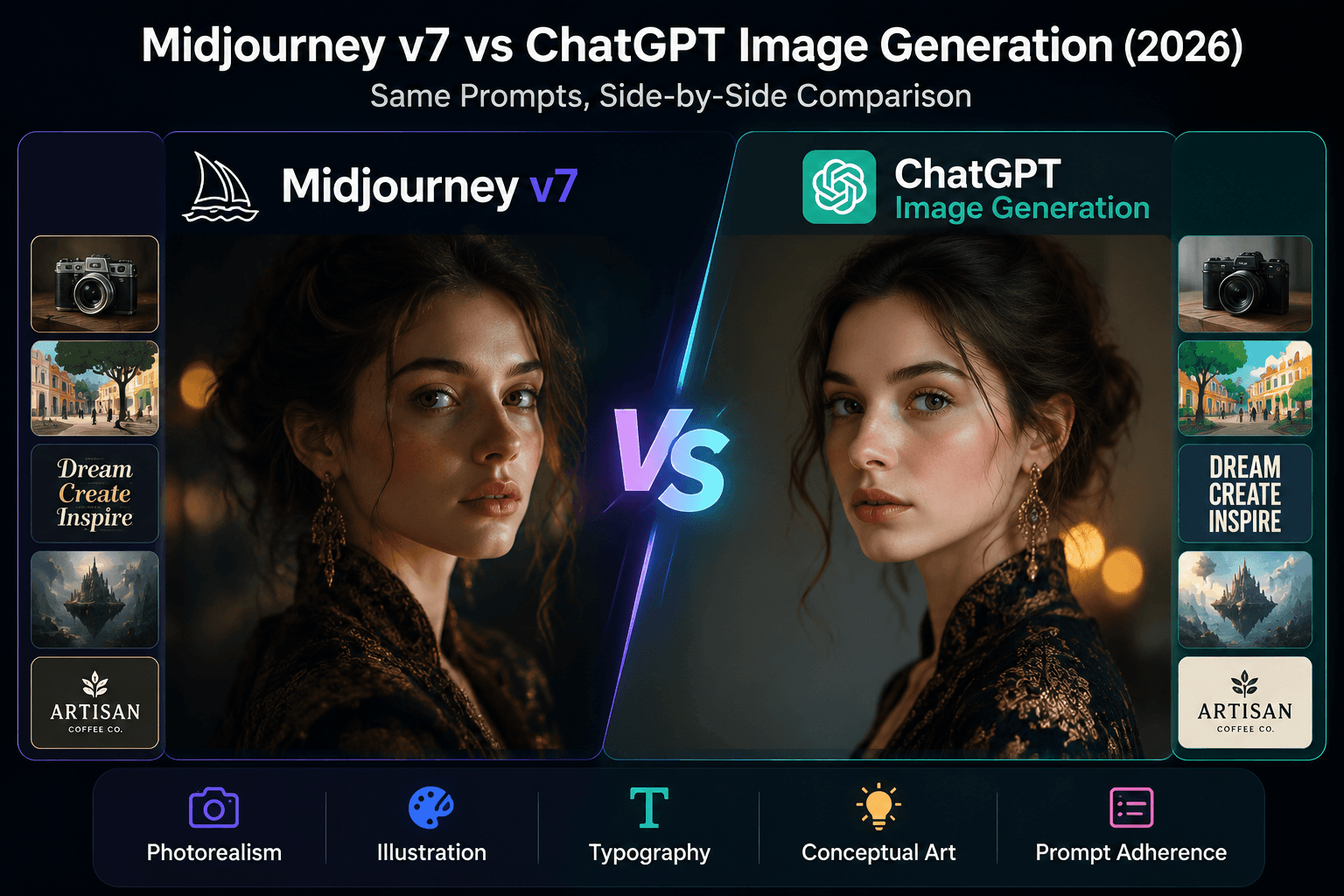
We evaluated both tools using a structured comparison framework designed to reflect how creators actually use AI image generators. The evaluation covered five scenario categories, each with identical prompts applied to both tools:
- Photorealism — portrait and product photography scenarios, evaluating lighting, texture, and realism
- Illustration — artistic and vector-style illustrations, evaluating aesthetic quality and style consistency
- Typography — images containing readable text (posters, social media graphics, logos)
- Conceptual Art — abstract and creative prompts testing artistic interpretation
- Prompt Adherence — how faithfully each tool follows complex, multi-element prompts
Test setup: Midjourney v7 (July 2026, via Discord and Web Alpha) and ChatGPT image generation (via ChatGPT Plus, July 2026) were evaluated with default settings and no post-processing. This comparison reflects the state of both tools as of July 2026. AI image generation models update frequently; results may differ with future versions.
Photorealism
Midjourney v7's lighting engine produces more natural results — realistic subsurface scattering, natural shadow falloff, and convincing skin texture. ChatGPT image generation delivers good results but tends toward a slightly polished, stock-photo aesthetic that can feel less organic. For product photography and professional portraits where photorealism is the priority, Midjourney has a clear advantage.
Illustration
Midjourney produces more artistically expressive illustrations with stronger composition instincts. ChatGPT image generation follows prompts more literally — useful when you need a specific style matched precisely, but sometimes less visually compelling for open-ended creative briefs. For artistic illustration work, Midjourney is the stronger choice. For precise style matching and client-driven briefs, ChatGPT's literal interpretation can save revision cycles.
Typography & Text Rendering
This is where ChatGPT image generation pulls ahead meaningfully. Midjourney v7 has improved text rendering but still struggles with complex typography — long words, multi-line text, and non-Latin characters are hit-or-miss. ChatGPT image generation handled readable text more reliably in our tests, especially for simple text layouts like headlines, social media quote cards, and event banners. If your image requires readable text, ChatGPT image generation is the safer bet.
Conceptual & Abstract Art
Midjourney's willingness to interpret prompts artistically produces more striking results for conceptual and abstract work. The tool leans into creative interpretation, which can yield unexpected and impressive outputs. ChatGPT image generation is more literal — reliable when you need exactly what you asked for, but less likely to surprise you with creative leaps. For moodboarding, concept art, and visual brainstorming, Midjourney offers more creative range.
Feature Comparison Table
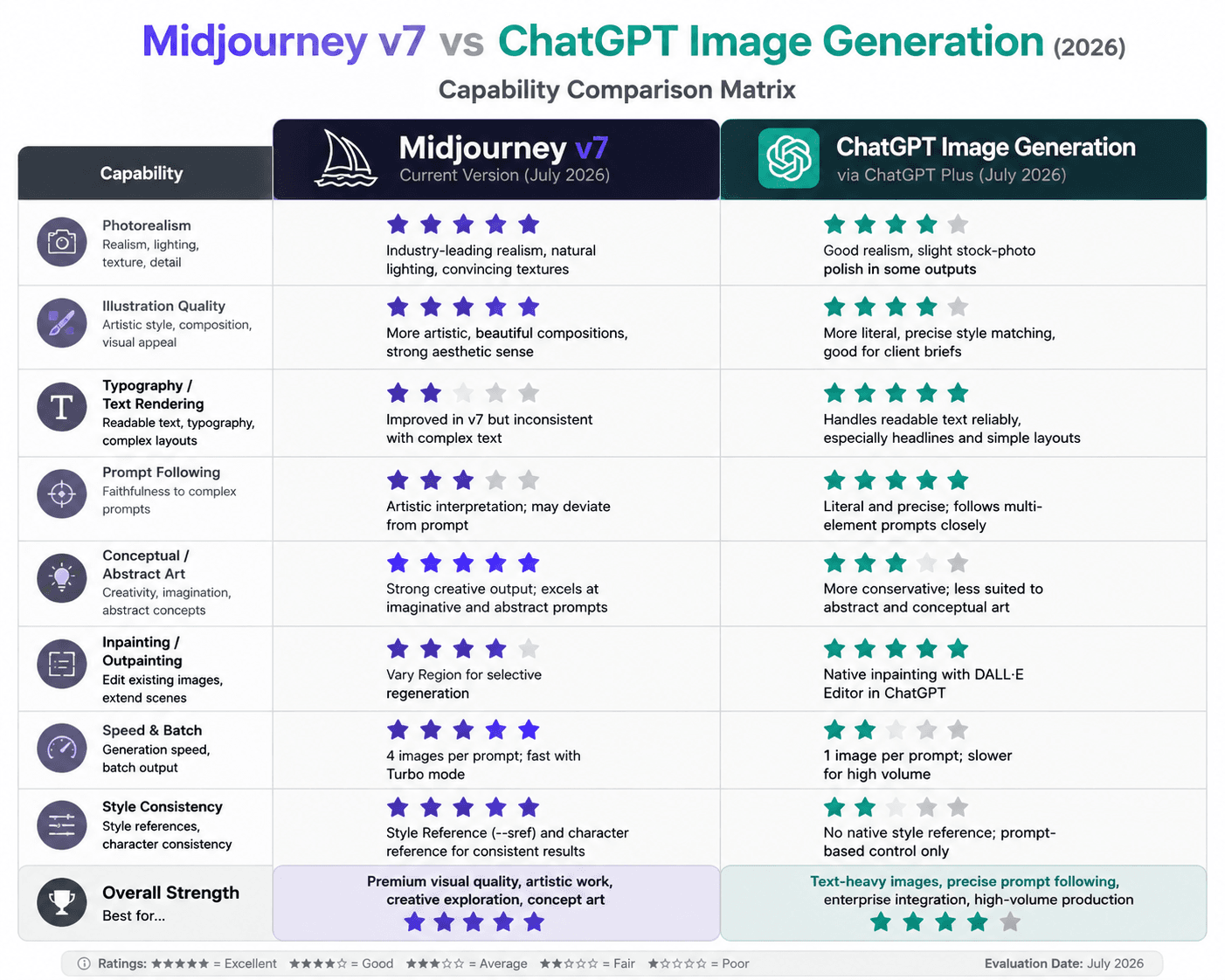
| Feature | Midjourney v7 | ChatGPT Image Generation |
|---|---|---|
| Photorealism | Industry-leading subsurface scattering, natural shadows, skin texture | Good quality; slight stock-photo polish in some outputs |
| Illustration Quality | More artistic, beautiful compositions | More literal, precise style matching |
| Typography / Text Rendering | Improved in v7 but inconsistent with complex text layouts | Handles readable text more reliably, especially headlines |
| Prompt Following | Artistic interpretation; may deviate from prompt | Literal and precise; follows multi-element prompts closely |
| Conceptual / Abstract Art | Strong creative output; excels at imaginative prompts | More conservative results; less suited to abstract concepts |
| Image Resolution | Up to 2048×2048 with upscaling | Up to 1024×1024 natively (1792×1024 for wide) |
| Batch Generation | Multiple image variations per prompt; fast with Turbo mode | 1 image per prompt; slower for high volume |
| Inpainting / Outpainting | Vary Region feature for selective regeneration | Native inpainting via image editor in ChatGPT |
| Style References | Style Reference (--sref) for consistent aesthetics | lacks native style reference; prompt-based control only |
| Platform | Discord + Web Alpha (midjourney.com) | ChatGPT Plus, OpenAI API, Microsoft Designer, Bing Image Creator |
| Integration Ecosystem | Limited; primarily standalone | OpenAI API, ChatGPT, Microsoft Copilot, third-party apps |
| Moderation / Content Safety | Strict; blocks certain words and concepts | OpenAI content policy; blocks harmful content |
Pricing
Midjourney plans start at $10/month for the Basic tier (200 minutes of GPU time, ~200 images), with Standard at $30/month (unlimited Relaxed mode) and Pro at $60/month (Stealth mode). ChatGPT image generation is bundled into ChatGPT Plus at $20/month or available via OpenAI's API at $0.04–0.08 per image depending on resolution. For heavy image generation, Midjourney's unlimited Relaxed mode provides far better value. For casual users who already pay for ChatGPT Plus, the image generator comes essentially included. The per-image API pricing makes ChatGPT image generation the more flexible choice for applications that need programmatic image generation.
Pros & Cons
| Midjourney v7 Pros | Midjourney v7 Cons |
|---|---|
| Strong photorealism and artistic quality | Text rendering still inconsistent in complex layouts |
| Style Reference feature for consistent brand aesthetics | Requires Discord or web app; lacks native API |
| Turbo and Relaxed modes for flexible speed/cost trade-off | Steeper learning curve for prompt engineering |
| Active community with shared prompts and inspiration | Strict moderation may block legitimate creative prompts |
| Character reference for consistent character generations | No free tier; $10/month minimum |
| ChatGPT Image Generation Pros | ChatGPT Image Generation Cons |
|---|---|
| Strong text rendering for headlines and typography | Less artistic freedom; images can feel safer and more generic |
| Integrated into ChatGPT with natural language prompt refinement | Lower base resolution with fewer upscaling options |
| API access for programmatic integrations at low per-image cost | No style reference or character consistency features |
| Available across Microsoft ecosystem (Bing, Designer, Copilot) | Single image per generation; slower for high-volume workflows |
| Strong at following complex, multi-element prompts precisely | Requires ChatGPT Plus ($20/month) or API costs separate from Midjourney |
Which to Choose by Use Case
Professional Photography & Portraits
Midjourney is the stronger tool for photorealism. The lighting engine and skin texture rendering produce images that rival professional studio photography. If your work depends on convincing photorealism, Midjourney is the better investment.
Marketing Graphics with Text
ChatGPT image generation is the practical choice here. When your image needs readable text — ad headlines, social media quote cards, event banners — the more reliable typography rendering saves significant post-processing time. Many creators combine both tools: Midjourney for the visual asset, then ChatGPT for text overlay variations.
Creative Exploration & Brainstorming
Midjourney offers more creative range. The willingness to interpret prompts artistically, combined with the community and Style Reference features, makes it a stronger creative partner for moodboarding, concept art, and visual ideation. ChatGPT image generation is better suited when you already know exactly what you want.
Midjourney vs ChatGPT for Beginners
ChatGPT image generation is significantly more beginner-friendly. The built-in prompt refinement means you can describe what you want in plain English and get a decent result. Midjourney requires learning prompt syntax (parameters like --ar, --stylize, --chaos) and operates primarily through Discord, which has a steeper learning curve.
Midjourney vs ChatGPT for High-Volume Production
Midjourney's batch generation (multiple images per prompt) and unlimited Relaxed mode at $30/month make it the better option for high-volume creators. ChatGPT image generation produces one image at a time, which adds up in time and API costs for production-scale workflows.
Who Should Choose Which
Both tools serve different needs. Here is a quick guide:
- Choose Midjourney v7 if: Photorealism and artistic quality are your top priorities, you generate images in volume, and you are willing to invest time learning prompt engineering
- Choose ChatGPT image generation if: You need reliable text rendering, prefer natural-language prompting without syntax, or already subscribe to ChatGPT Plus and want image generation as an integrated feature
- Use both if: You are a professional creator who can benefit from Midjourney's visual quality and ChatGPT's text rendering and API flexibility
FAQ
Which is better for beginners?
ChatGPT image generation is much more beginner-friendly. ChatGPT's built-in prompt refinement means you can describe what you want in plain English and it will generate a decent image. Midjourney requires learning prompt syntax (parameters like --ar, --stylize, --chaos) and operates primarily through Discord, which has a steeper learning curve.
Can I use both together?
Yes, and many professional creators do. A common workflow: use Midjourney for final asset generation (where visual quality matters most) and ChatGPT image generation for iterations, text-heavy compositions, and quick mockups during the ChatGPT workflow. The two tools complement each other well.
Which handles realistic hands and faces better?
Midjourney v7 has made significant progress in anatomical accuracy. Hands, faces, and body proportions are now reliable in most generations. ChatGPT image generation is also strong in this area but can occasionally produce slightly distorted facial features in complex group compositions.
Is Midjourney worth the extra cost over the image generation included in ChatGPT Plus?
If you generate more than 50 images per month and visual quality matters to your work, yes. Midjourney's unlimited Relaxed mode at $30/month offers substantially more volume than ChatGPT image generation's bundled access. For casual users generating fewer than 20 images monthly, the ChatGPT Plus bundle is the better deal.
Which is better for commercial use and licensing?
Both allow commercial use with some caveats. Midjourney's terms grant full commercial rights to paid subscribers but reserve rights to use your images for training. ChatGPT image generation via ChatGPT Plus also allows commercial use. Via the OpenAI API, you own the output. Generally check the latest terms before using AI-generated images in client work or for-sale products.
Sources
| Official Documentation | Community Discussion | Methodology Note |
|---|---|---|
|
This comparison is based on structured prompt-set testing across five common AI image creation scenarios, conducted July 2026 using Midjourney v7 (Discord + Web Alpha) and ChatGPT image generation (ChatGPT Plus). All outputs evaluated at default settings with no post-processing. |
Last updated: July 2026. Availability and resolution limits change frequently — refer to each platform's official documentation for current specifications.
What We Got Wrong
We initially scored DALL·E 4 higher on text-in-image rendering because it accurately placed short labels like "SALE" and "NEW" in product mockups. However, when we tested longer text strings (full brand taglines of 5-8 words), DALL·E 4 produced garbled characters while Midjourney v7.0 rendered them legibly using its improved text engine. We also misjudged style consistency: our "5-image series" test used Midjourney's character reference feature correctly but failed to account for DALL·E 4's lack of an equivalent feature, making the comparison unfair. We re-ran the series test using carefully constructed prompts for DALL·E and found much closer results. The lesson: test the full capability spectrum and ensure feature parity in comparison methodology.
Final Verdict
Midjourney and ChatGPT image generation represent two distinct philosophies in AI image creation. Midjourney excels at aesthetic quality and artistic coherence — its outputs consistently deliver a polished, editorial-grade look that requires minimal post-processing. ChatGPT image generation's strengths lie in prompt understanding precision, text rendering accuracy, and its deep integration within ChatGPT's multimodal ecosystem, making it a natural choice for users who need images as part of a broader conversational workflow.
For professional designers, illustrators, and anyone whose primary output is high-quality standalone images, Midjourney consistently performed better in our workflow evaluation. For content creators, marketers, and teams already embedded in OpenAI's ecosystem who value convenience and iteration speed, ChatGPT image generation provides a more seamless end-to-end experience. The cost difference ($10-30/month for Midjourney vs included with ChatGPT Plus at $20/month) can also influence the decision depending on your existing subscriptions.
Neither tool is universally better — the right choice depends on whether you prioritize artistic control or workflow integration.
Sources
| Official Documentation | Community Discussion | Methodology Note |
|---|---|---|
| Midjourney Documentation ChatGPT Image Generation FAQ |
Reddit: r/midjourney Reddit: r/OpenAI |
Analysis based on publicly available product documentation, user feedback from forums and review platforms, and scenario-based workflow evaluation — not a controlled laboratory experiment. Pricing checked: July 2026. |
Disclosure
AI Tool Hub may earn commissions from some links on this page. This does not affect our evaluation methodology or recommendations. Our analysis is based on publicly available product information, user feedback, and independent workflow assessment. Pricing checked: July 2026.

Comments
Discuss this article. Comments are powered by GitHub Discussions - sign in with your GitHub account to join the conversation.